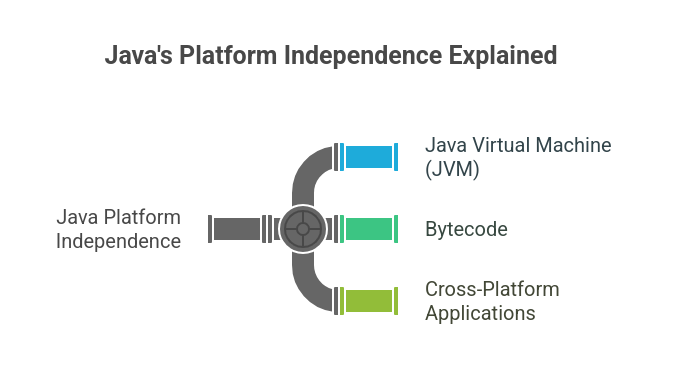
Java is an object-oriented, class-based, high-level language with its own platform. Java programs compile to bytecode and executed by the Java Virtual Machine, making the code portable across all operating systems.
Java has strong static typing, garbage collection, and a rich standard library. It is used to develop server-side, Android, and enterprise software.
Learn Java the right way! Our course teaches you essential programming skills, from coding basics to complex projects, setting you up for success in the tech industry.
Below are 30 innovative Java projects, grouped by difficulty level, to assist you in developing your expertise and building your portfolio. For every project, there is information on its features, the main tools and libraries employed, and a hyperlink to the source code.
Java Projects for Beginners
1. Console-Based Calculator
Project Details: A simple console calculator that performs basic arithmetic operations like addition, subtraction, multiplication, and division. This project teaches basic Java syntax, user input using the Scanner class, and control flow using switch statements.
Features:
- Addition, subtraction, multiplication, and division.
- User-friendly console interface.
- Error handling for invalid input.
Key Tools & Libraries:
- Java Development Kit (JDK)
- Scanner Class
2. Digital Clock with GUI
Project Details: A simple graphical digital clock that displays the current time. This project introduces beginners to GUI programming using Java Swing and handling time-related functionalities.
Features:
- Displays current time (hours, minutes, seconds).
- Updates in real-time.
- Simple and clean user interface.
Key Tools & Libraries:
- Java Swing
- Java AWT
3. Text-Based Adventure Game
Project Details: Create a text-based story game where user choices change the outcome of the story. This project gives practice in object-oriented programming (OOP) concepts like handling rooms, items, and characters as separate objects.
Features:
- Branching narrative based on user input.
- Explorable game world.
- Simple command-line interface.
Key Tools & Libraries:
- Java
- Scanner Class
4. Basic To-Do List Application
Project Details: A console application in which tasks can be added, viewed, and deleted. This project teaches how to save and load tasks using data structures like ArrayList and basic file input-output.
Features:
- Add new tasks.
- List all tasks.
- Delete tasks.
- Saves tasks to a file.
Key Tools & Libraries:
- Java
- ArrayList
- File I/O
5. Number Guessing Game
Project Details: Create a simple game where the computer generates a random number and the user has to guess it in a limited attempts. This project teaches how to generate random numbers and use loops for game logic.
Features:
- Random number generation.
- Limited number of guesses.
- Feedback to the user (e.g., "too high," "too low").
- Score tracking.
Key Tools & Libraries:
- Java
- Random Class
- Scanner Class
6. Simple Banking Application
Project Details: A console application that simulates basic banking operations like creating a new account, depositing, and withdrawing money. This project teaches how to practically apply object-oriented programming concepts and manage simple data.
Features:
- Account creation with a unique account number.
- Deposit and withdraw funds.
- Check account balance.
Key Tools & Libraries:
- Java
- OOP Principles
- Scanner Class
7. Word Counter
Project Details: A tool that can count the number of words and letters in a given text. This project can practice string manipulation and basic algorithm design.
Features:
- Counts total words.
- Counts total characters.
- Can handle various text inputs.
Key Tools & Libraries:
- Java
- String Manipulation
8. Tic-Tac-Toe Game
Project Details: The classic Tic-Tac-Toe game, where two players can play against each other in the console. This project is excellent for understanding 2D arrays and implementing game logic.
Features:
- Two-player gameplay.
- Win and draw condition checking.
- Displays the game board in the console.
Key Tools & Libraries:
- Java
- 2D Arrays
- Scanner Class
9. Currency Converter
Project Details: A simple application to convert an amount from one currency to another. For beginners, this can start with fixed conversion rates and can be extended to fetch real-time rates from an API for a more advanced version.
Features:
- Convert between multiple currencies.
- User-friendly input for amounts and currencies.
- Displays the converted amount.
Key Tools & Libraries:
- Java
- Basic arithmetic operations
10. Simple File Encryptor/Decryptor
Project Details: A basic tool that can encrypt a text file using a simple algorithm (like a Caesar cipher) and then decrypt it back. This project introduces concepts of file handling and basic cryptography.
Features:
- Encrypts the content of a text file.
- Decrypts the content back to the original text.
- Uses a simple substitution cipher.
Key Tools & Libraries:
- Java
- File I/O
- Basic Encryption Logic
11. Currency Converter Application
Project Details: A functional application that converts one currency to another using fixed rates or a free external API (like ExchangeRate-API). It introduces JSON parsing and basic GUI or console input handling.
Features:
- Converts amounts between different international currencies.
- Fetches real-time exchange rates via API or uses hardcoded values.
- Handles invalid inputs and exceptions gracefully.
Key Tools & Libraries:
- Core Java
- Java Swing (for GUI) or Scanner class (for console)
- JSON Parsing (e.g., org.json)
12. Personal Expense Tracker
Project Details: A straightforward desktop or console application for users to log, categorize, and track their daily expenses. This project provides solid experience with basic CRUD operations and local data storage without needing a complex database.
Features:
- Allows users to add, edit, and delete daily expenses.
- Filters spending by specific months or categories (e.g., food, rent).
- Calculates and displays total spending summaries.
Key Tools & Libraries:
- Core Java
- Java Collections (Lists, Maps)
- File I/O (Serialization) or SQLite
Intermediate Java Projects
13. Library Management System
Project Details: A system that can manage library books. It has the facility to add new books, issue books to members, and track their return. This project can help you learn to create a slightly larger application with database connectivity and a GUI through JDBC.
Features:
- Manage book inventory.
- Track member information.
- Handle book borrowing and returning.
- Database integration.
Key Tools & Libraries:
- Java Swing or JavaFX
- JDBC
- MySQL or other relational database
14. Snake Game
Project Details: A clone of the classic Snake game with a graphical interface. This project involves game loop implementation, keyboard event handling for controls, and collision detection.
Features:
- Classic Snake gameplay.
- Score tracking.
- Collision detection with walls and itself.
- Increasing difficulty.
Key Tools & Libraries:
- Java Swing or JavaFX
- Game Loop Logic
- Event Handling
15. Weather Application
Project Details: An application that displays weather data of a location by extracting it from a free weather API. This project can help you learn to work with APIs and parse JSON data.
Features:
- Fetches real-time weather data.
- Displays temperature, humidity, and other details.
- GUI for user input and data display.
Key Tools & Libraries:
- Java
- HTTP Client (e.g., HttpURLConnection)
- JSON parsing library (e.g., Gson, Jackson)
- Java Swing or JavaFX
16. Chat Application
Project Details: A simple client-server chat application where multiple users can connect to the server simultaneously and send messages in real-time. This project can help you practically understand networking concepts like sockets and multithreading.
Features:
- Real-time messaging between multiple clients.
- Server to handle client connections.
- Basic user interface for sending and receiving messages.
Key Tools & Libraries:
- Java Sockets
- Multithreading
- Java Swing or JavaFX
17. Brick Breaker Game
Project Details: The classic arcade game where the player controls a paddle to bounce a ball and break bricks. This project reinforces concepts of game development, including collision detection and game state management.
Features:
- Paddle and ball movement.
- Brick destruction.
- Score and lives tracking.
- Power-ups (optional).
Key Tools & Libraries:
- Java Swing or JavaFX
- Game Loop
- Collision Detection
18. Student Management System with Database
Project Details: A comprehensive application to manage student records, including personal details, courses, and grades. This project is a step up from a simple data management system and provides solid experience with database operations and GUI development.
Features:
- Add, update, delete, and view student records.
- Search for students.
- Connects to a database to store information.
Key Tools & Libraries:
- Java Swing or JavaFX
- JDBC
- MySQL or H2 Database
19. GUI-Based Calculator with Advanced Functions
Project Details: An enhanced version of the basic calculator with a graphical user interface and scientific functions. This project allows for more complex UI design and handling a wider range of mathematical operations.
Features:
- Standard arithmetic operations.
- Scientific functions (e.g., trigonometric, logarithmic).
- Memory functions (M+, MR, MC).
- Interactive GUI.
Key Tools & Libraries:
- Java Swing or JavaFX
- Event handling for button clicks.
20. Online Quiz Application
Project Details: An application that shows multiple-choice questions to the user and gives the score at the end. The questions can be taken from a file or a database. Data handling can be practiced through this project.
Features:
- Timed quizzes.
- Multiple-choice questions.
- Score calculation and display.
- Loads questions from an external source.
Key Tools & Libraries:
- Java Swing or JavaFX
- File I/O or JDBC
- Timer class for countdowns.
21. E-commerce Application Backend
Project Details: The backend for a simple e-commerce platform using Spring Boot. This project involves creating REST APIs for managing products, users, and orders. It's a great introduction to building web services with a popular Java framework.
Features:
- REST APIs for CRUD operations on products and users.
- User authentication and authorization with Spring Security.
- Integration with a database using Spring Data JPA.
Key Tools & Libraries:
- Java
- Spring Boot
- Spring Data JPA (Hibernate)
- MySQL or PostgreSQL
- Maven or Gradle
Learners interested in building complete web applications beyond backend APIs can strengthen their frontend and backend skills through a MERN Full Stack Developer Course, where they work with React, Node.js, Express, and MongoDB in real-world projects.
MERN Full Stack Developer Course
Learn full-stack web development with MERN. Build powerful apps, improve your skills, and open doors to new career opportunities today.
22. Simple Web Scraper
Project Details: Creating a tool that can extract specific information from a website. Like all the headlines from a news site or product prices from an e-commerce page. This project teaches reading HTML structure and sending web requests.
Features:
- Connects to a URL and fetches HTML content.
- Parses HTML to extract desired data.
- Saves the extracted data to a file (e.g., CSV).
Key Tools & Libraries:
- Java
- Jsoup (for HTML parsing)
- HttpURLConnection or Apache HttpClient
23. Movie Ticket Booking System
Project Details: A web application where users can browse theatrical releases, select seats, and book tickets, while admins manage theaters and showtimes. This builds understanding of session management and containerization.
Features:
- Implements role-based access control (Admin vs. User).
- Handles interactive seat selection and prevents double-booking.
- Tracks booking history for individual users.
Key Tools & Libraries:
- Core Java
- Spring Boot & Spring Security
- PostgreSQL
- Docker
Final Year Java Projects
24. Real-time Collaborative Whiteboard
Project Details: Creating a web-based whiteboard on which multiple users can draw simultaneously. This requires the skill to handle real-time communication. Using WebSockets, all users can show each other's drawings in real-time.
Features:
- Multi-user drawing in real-time.
- Basic drawing tools (pen, eraser).
- Synchronization of the canvas across all clients.
Key Tools & Libraries:
- Java
- Java WebSocket API (JSR 356) or a framework like Spring WebSockets
- JavaScript (for the frontend)
- HTML5 Canvas
25. Spring Boot Microservices Application
Project Details: Creating a system that is made up of many different microservices, and all the services communicate with each other. Like a simple e-commerce setup in which there are different services for users, products, and orders, and each service can be deployed independently.
Features:
- Multiple microservices (e.g., user-service, product-service).
- Service discovery and registration (e.g., using Eureka or Consul).
- API Gateway to route requests.
- Communication between services (e.g., REST or messaging queues).
Key Tools & Libraries:
- Java
- Spring Boot, Spring Cloud
- Netflix Eureka or HashiCorp Consul
- Spring Cloud Gateway
- Docker
26. Blockchain-Based Transaction System
Project Details: Creating a simplified implementation of blockchain to understand its core concepts. It involves creating blocks, adding them to a chain with a cryptographic hash, and verifying the integrity of the entire chain.
Features:
- Creating and hashing blocks.
- Proof-of-work concept.
- Adding new transactions to the chain.
- Chain validation.
Key Tools & Libraries:
- Java
- Cryptography libraries (e.g., java.security for hashing)
- Data structures for blocks and transactions.
27. Machine Learning-Powered Spam Email Filter
Project Details: Creating a program that classifies emails as spam or non-spam using machine learning. This involves processing text data, extracting features and training a classification algorithm.
Features:
- Trains a model on a dataset of spam and non-spam emails.
- Classifies new emails based on the trained model.
- Uses Natural Language Processing (NLP) techniques.
Key Tools & Libraries:
- Java
- Weka or Deeplearning4j (DL4J)
- NLP libraries for text processing.
28. Simple Search Engine
Project Details: Creating a program that indexes a large number of text documents and allows keyword searching. In this, information retrieval concepts such as indexing and ranking are practically implemented.
Features:
- Indexes a set of documents.
- Processes user queries to find relevant documents.
- Ranks search results based on relevance.
Key Tools & Libraries:
- Java
- File I/O for reading documents.
- Data structures for indexing (e.g., Inverted Index).
- Apache Lucene (for a more advanced implementation).
29. Network Packet Sniffer
Project Details: A tool that captures and analyzes network packets on a local network. This project provides a deep dive into networking and requires understanding network protocols.
Features:
- Captures packets from a network interface.
- Parses and displays information about the packets (e.g., source/destination IP, protocol).
- Filtering capabilities for specific types of packets.
Key Tools & Libraries:
- Java
- A library for packet capturing like Pcap4j or Jpcap.
30. Distributed Task Scheduler
Project Details: A system that can schedule and execute tasks on different nodes in a distributed environment. It includes concepts of distributed systems, creating task queues, and handling fault tolerance. The system runs tasks on a schedule or interval, distributes them across different workers in a cluster, and ensures that the tasks are completed even in the case of failure.
Key Features:
- Running tasks on a schedule or interval
- Distributing tasks across multiple workers in a cluster
- Handling failure and ensuring that the tasks are completed
Key Tools and Libraries:
- Java
- Messaging queue like RabbitMQ or Apache Kafka
- Distributed coordination service like Apache ZooKeeper
- Quartz framework for scheduling
31. Real-time Stock Market Dashboard
Project Details: A dashboard that displays real-time stock market data by connecting to a financial data API. This involves handling streaming data, and creating a dynamic and responsive user interface.
Features:
- Real-time updates of stock prices.
- Visualization of stock data with charts.
- Ability to track multiple stocks.
Key Tools & Libraries:
- Java
- WebSocket client for real-time data.
- JavaFX or a web framework (with Java backend) for the UI.
- A charting library.
32. Custom ORM (Object-Relational Mapping) Framework
Project Details: Building a simplified version of an ORM framework like Hibernate. This is a highly advanced project that requires a deep understanding of Java reflection, annotations, and JDBC.
Features:
- Mapping Java objects to database tables using annotations.
- Basic CRUD (Create, Read, Update, Delete) operations.
- A simple query language or criteria API.
Key Tools & Libraries:
- Java Reflection API
- Java Annotations
- JDBC
33. AI-Powered Chatbot
Project Details: A chatbot that can understand user queries and answer them in a conversational manner. It goes beyond simple rule-based logic and uses natural language processing and machine learning to better understand and respond. Chatbot recognizes intent, extracts entities, can fetch data from external APIs and also remembers conversation context.
Key features:
- Understanding natural language
- Intent recognition and entity extraction
- Fetching data from external APIs
- Maintaining conversation context
Key tools and libraries:
- Java
- NLP libraries like Apache OpenNLP, Stanford NLP
- Machine learning framework like DL4J (for intent classifier training)
- Web service framework like Spring Boot (for deployment)
34. Highly-Concurrent BookMyShow Clone
Project Details: An enterprise-grade, high-performance movie booking system designed to handle heavy traffic and concurrent transactions. This project demonstrates mastery over distributed architecture and thread safety.
Features:
- Manages concurrency control to prevent multiple users from booking the exact same seat.
- Utilizes a scalable, distributed microservices architecture.
- Integrates JWT token authentication and secure payment mockups.
Key Tools & Libraries:
- Java
- Spring Boot Microservices
- MySQL
- React (Frontend integration)
35. Real-Time Expense Analytics Pipeline
Project Details: A real-time data pipeline that processes and stores high-velocity credit card transactions to generate live financial reports. It showcases the ability to handle big data and event-driven architectures.
Features:
- Streams and processes massive transaction data in real-time.
- Generates live financial analytics and reporting.
- Stores highly available data using a NoSQL database.
Key Tools & Libraries:
- Java & Spring Boot
- Apache Kafka
- Apache Spark
- Cassandra (NoSQL)
Building projects is the best way to turn theory into real-world skills. However, if you try to build a project without a plan, it can feel like trying to build a house without a blueprint. To build your expertise the right way, join our free Java Course. It is the easiest way for absolute beginners to go from zero experience to a pro with a clear, step-by-step path.
How to Showcase Java Projects on Your Resume and GitHub?
Building the project is only half the battle; how you present it to recruiters determines whether you get the interview. To make your Java projects portfolio-friendly, follow these best practices:
- Write a Stellar README: Never leave your GitHub repository blank. Include a project description, a list of the tech stack used, setup instructions, and screenshots of the application working.
- Containerize and Deploy: Don't just leave your code on your local machine. Use Docker to containerize your Spring Boot application and deploy it to cloud platforms like AWS Elastic Beanstalk, Heroku, or Render. Provide a live demo link.
- Highlight Architectural Decisions: In your resume bullets, mention why you chose certain tools. Example: "Built a scalable E-commerce REST API using Spring Boot, reducing database query times by 20% through efficient Hibernate ORM mapping."
Also Check: